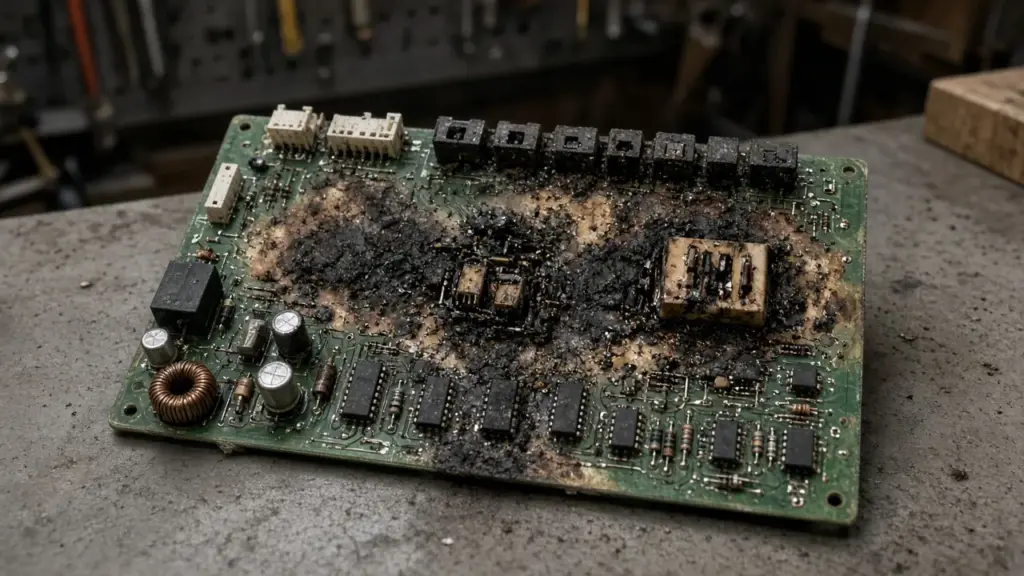
Spring and early summer thunderstorms are part of life in North Texas. Along with hail and heavy rain, they bring lightning and power fluctuations that can damage electronics throughout the home. Sprinkler controllers are particularly exposed because they connect to long runs of wire buried across the yard, wiring that can pick up electrical surges from nearby lightning strikes.
This guide explains how surge and lightning damage affects irrigation systems, how to recognize it, and how to reduce the risk.
How Surges Reach an Irrigation System
Surges can enter an irrigation controller in two main ways:
- Through the power supply. Surges on the home’s electrical system travel through the outlet or hardwired connection to the controller’s transformer and circuitry.
- Through field wiring. Valve wires run underground across the yard, sometimes for long distances. A nearby lightning strike can induce voltage in these wires, which travels back to the controller.
Controllers connected to long wire runs or located in areas with frequent lightning may be more vulnerable.
Signs of Surge Damage
- Blank or scrambled display after a storm
- Controller will not power on even with a working outlet
- Some stations work, others do not
- Stations that run continuously or will not turn off
- Erratic behavior, such as random starts
- Lost programming despite a good backup battery
- Burned smell or scorch marks on the circuit board or terminal strip
- Blown fuse or tripped circuit breaker in the controller
Surge damage can also affect valve solenoids, rain sensors, and flow sensors.
Step 1: Check Power Basics
Before assuming the controller is damaged:
- Check the outlet with another device
- Reset any GFCI outlets and circuit breakers
- Check the transformer; many controllers use a plug-in transformer that can fail independently
- Check for a blown fuse in the controller, if it has one
A failed transformer may be replaceable without replacing the controller.
Step 2: Test Stations
If the controller powers on but some stations do not work:
- Run each station manually.
- For stations that do not operate, test the solenoid with a multimeter at the controller terminals.
- Swap a known-good station wire to the suspect terminal to see whether the problem follows the terminal or the wire.
If the problem stays with the terminal, the controller output may be damaged. If it follows the wire, the solenoid or field wiring may be damaged. Our guide to a zone that will not turn on covers electrical troubleshooting.
Step 3: Check the Rain Sensor
Surges can damage rain and freeze sensors, particularly wired sensors with long runs. If the controller shows the sensor as active when it should not be, or ignores it entirely, test or replace the sensor. Dallas requires working rain and freeze sensors on automatic systems. See our guide to rain and freeze sensors.
Repair or Replace?
- Transformer only: replace the transformer.
- Blown fuse: replace the fuse and see if the controller recovers.
- Damaged station outputs on a modular controller: some controllers allow replacement of station modules.
- Damaged main board: often replacement is more practical.
Our irrigation controller repair guide explains repair and upgrade options. If you are replacing, a smart controller can add features such as weather adjustment and remote control.
Reducing Surge Risk
Surge Protection
- Plug-in surge protectors for controllers that plug into outlets
- Whole-home surge protection at the electrical panel, installed by an electrician
- Controllers with built-in surge protection on station outputs
Grounding
Some controllers, particularly commercial and larger residential models, are designed to be connected to an earth ground to divert surges. Follow the manufacturer’s grounding instructions. Proper grounding is often required for surge protection warranties.
Wiring Practices
- Use proper direct-burial irrigation wire
- Make waterproof splices
- Avoid running irrigation wire alongside other electrical lines where not appropriate
Unplugging During Storms
Some homeowners unplug plug-in controllers during severe storms. That offers protection from surges through the power supply but not necessarily through field wiring. Remember to plug the controller back in and confirm the clock and program afterward.
Smart Controllers and Surges
Wi-Fi controllers are also vulnerable to surges. After a storm, check that the controller reconnected to Wi-Fi and that the schedule is correct. If your router was also damaged, the controller may need to be reconnected to a new network. Our guide to a controller that lost its program after a power outage covers recovery steps.
After a Storm Checklist
- Check that the controller display is normal
- Confirm the clock and program
- Run each station briefly
- Check the rain sensor
- Walk the yard to confirm zones operate
Insurance and Documentation
If lightning damages your irrigation system along with other electronics, document the damage with photos and notes. Some homeowner insurance policies cover lightning damage. Check your policy and keep repair records.
Solenoid Damage
Surges can travel through field wiring and damage valve solenoids. A solenoid that tests open or shorted after a storm may need replacement. Our guide to replacing a sprinkler solenoid explains how.
Controller Location Matters
Where a controller is mounted affects its exposure. Controllers on exterior walls, near downspouts, or close to where the electrical service enters the home may be more exposed to surges. Garage-mounted controllers are protected from weather but still share the home’s circuits. When replacing a controller after surge damage, consider whether a different location, a dedicated surge protector, or a controller with stronger built-in protection makes sense.
Repeated Failures
If a controller fails after every major storm, that is a sign the system needs better protection, not just another replacement. Common contributing factors include:
- No surge protection on the power supply
- Missing or poor grounding where the manufacturer calls for it
- Long unprotected wire runs to distant valves
- Damaged wire insulation underground that lets moisture and stray voltage in
An evaluation of power, grounding, and field wiring can identify the weak point. Replacing controllers repeatedly without addressing the cause gets expensive.
Keep a Backup of Your Program
A surge that ruins a controller also wipes out any settings stored only on it. Photograph each program, or write down watering days, start times, and zone run times. With that record, a replacement controller can be programmed in minutes. Remember to set it to your Dallas watering days: Sundays and Thursdays for even addresses, Wednesdays and Saturdays for odd addresses, with all sprinkler watering finished before 10 a.m.
Hail and Wind Damage
Storms that bring lightning often bring hail and high winds too. Hail can crack rain sensors and damage outdoor controller cabinets. After a severe storm, inspect exterior components for physical damage as well as electrical problems.
Frequently Asked Questions
Can lightning damage a sprinkler controller?
Yes. Surges can enter through the power supply or through buried valve wiring.
How do I know if my sprinkler timer has surge damage?
Signs include a blank or scrambled display, stations that do not work, erratic operation, and burn marks on the board.
Will a surge protector protect my irrigation controller?
A surge protector helps protect against surges through the power supply. Surges through field wiring may require controller-level protection and grounding.
Can surge damage affect valves?
Yes. Surges can damage valve solenoids and rain sensors.
Get Help After a Storm
We diagnose surge damage, replace controllers and solenoids, and restore programming. See our sprinkler repair service, or contact us to schedule.
Request Service or call 214-227-7444
We serve homes throughout Dallas and nearby North Texas communities.