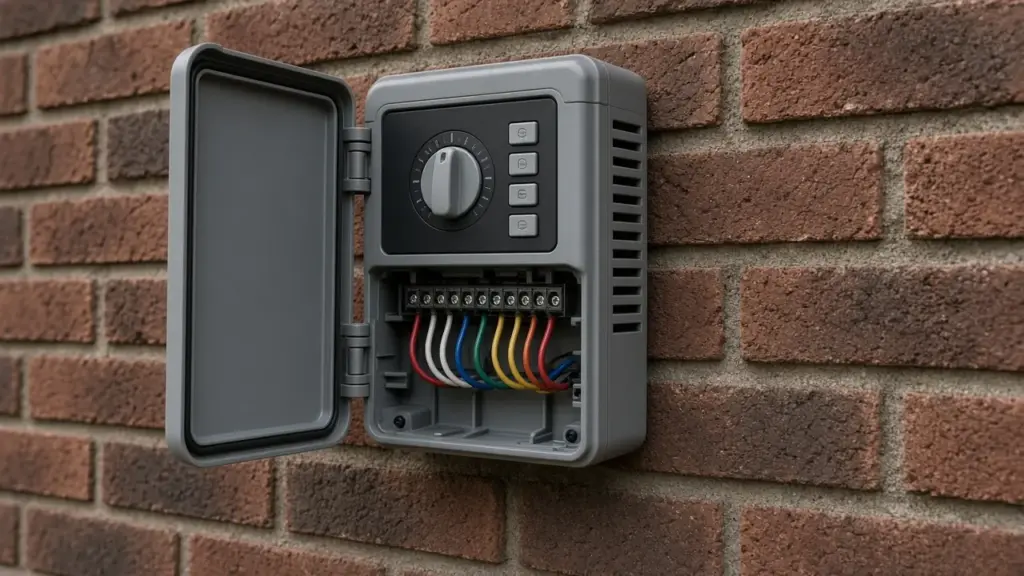
The Rain Bird ESP-TM2 is one of the controllers we see most often in Dallas homes. It is straightforward, reliable, and capable of everything a typical residential system needs, including multiple programs, several start times, seasonal adjustment, and a sensor input. Like any controller, though, it only works as well as it is programmed.
This guide covers practical setup tips for the ESP-TM2 on North Texas lawns. Menu names and button layouts can vary slightly by version, so keep the Rain Bird manual for your model handy, and use these tips as a checklist rather than exact keystrokes.
Know Your Controller
The ESP-TM2 uses a dial to select what you are setting, with buttons to change values. Typical dial positions include settings for the clock and date, start times, run times, watering days, seasonal adjust, manual watering, and off. The controller supports multiple independent programs, commonly labeled A, B, and C, each with its own start times and watering days.
Key features for Dallas homeowners:
- Multiple programs to separate lawn and drip zones
- Multiple start times per program, useful for cycle and soak
- Seasonal adjust to scale run times up or down by percentage
- Sensor terminals for a rain and freeze sensor
- Rain delay to pause watering for a set number of days
- Wi-Fi capability through Rain Bird’s add-on module on compatible units
Tip 1: Start With a Zone List
Before touching the controller, write down each station number and what it waters: front lawn rotors, side yard sprays, foundation drip, and so on. If you do not know, use manual watering to run one station at a time and watch the yard. This list drives every other setting.
Tip 2: Set the Clock and Date Correctly
Check AM and PM and the day of the week. A wrong day will put watering on the wrong days, even if you program your assigned days correctly.
Tip 3: Use Program A for Lawn, Program B for Drip
Assign lawn zones to one program and drip or bed zones to another. That lets drip run longer without overwatering the lawn. Make sure any program you do not use has no start times, or has all stations set to zero, so it cannot run by accident.
Tip 4: Set Watering Days to Your Dallas Assignment
Dallas assigns days by the last digit of your address:
- 0, 2, 4, 6, 8, or no number: Sundays and Thursdays
- 1, 3, 5, 7, or 9: Wednesdays and Saturdays
Use the custom days-of-week option rather than odd/even calendar dates, since the city schedule is based on weekdays. Our guide to programming a controller for the Dallas schedule explains the rules in detail.
Tip 5: Understand Start Times
On the ESP-TM2, as on most controllers, a start time applies to the whole program. Every station with a run time in that program runs in sequence at each start time. Three start times means three full cycles.
Use that intentionally for cycle and soak: split a long run into shorter runs across two or three start times, spaced so each zone has time to soak. Make sure the last cycle ends before 10 a.m., since Dallas prohibits sprinkler watering between 10 a.m. and 6 p.m. year-round. See our guide to the year-round watering ban.
Tip 6: Set Run Times by Head Type
- Spray zones: shorter run times
- Rotor and rotary nozzle zones: longer run times
- Shade zones: shorter than sun zones
- Drip zones: much longer, on their own program
Start conservatively and check soil moisture the day after watering. Adjust from there.
Tip 7: Use Seasonal Adjust
Seasonal adjust multiplies every run time by a percentage. Program run times for summer at 100 percent, then reduce the percentage in spring, fall, and winter. It is faster than changing each station and helps prevent overwatering in cooler months. Our year-round maintenance calendar suggests when to adjust.
Tip 8: Connect and Enable the Sensor
Dallas requires a working rain and freeze sensor on automatic systems. Connect it to the sensor terminals, remove any factory jumper as directed in the manual, and make sure the sensor setting is active, not bypassed. Test it by pressing the sensor’s test button or wetting it according to the manufacturer’s instructions and confirming the controller responds.
Tip 9: Use Rain Delay After Good Rains
After a significant rain, a rain delay pauses all programs for a set number of days. It is a simple way to avoid watering soil that is already wet. The sensor handles rain automatically, but a manual rain delay is useful for longer wet periods.
Tip 10: Consider Wi-Fi
Compatible ESP-TM2 units can connect to Wi-Fi through Rain Bird’s add-on module, allowing app control and weather-based adjustments. If you add Wi-Fi, set the app’s watering restrictions to your assigned days and block 10 a.m. to 6 p.m. Our controller repair and upgrade guide compares smart options.
Troubleshooting Common ESP-TM2 Issues
Watering on the wrong days
Check the clock, the day of the week, and all programs, including ones you thought were unused.
Zones running multiple times
Look for extra start times in the program.
A station will not run
Check whether it has a run time in the active program. If the controller shows a station fault, the wire or solenoid may be shorted. Our guide to a zone that will not turn on walks through diagnosis.
Program lost after a power outage
Controllers keep programs in memory, but the clock may need resetting after a long outage.
Nothing runs
Check power, the sensor status, rain delay, and whether the dial is left in the off position.
A Sample Setup to Adapt
Here is how a typical Dallas home with four lawn zones and one drip zone might be organized on an ESP-TM2. Your run times will differ based on heads, soil, and exposure.
- Program A (lawn): your two assigned days, two or three early-morning start times spaced for cycle and soak, run times on stations 1 through 4 only, seasonal adjust starting at 100 percent in peak summer.
- Program B (drip): a longer run time on the drip station, scheduled on a day and time that fits your routine and current city guidance.
- Program C: cleared, with no start times.
- Sensor: active.
After the first week, walk the yard the morning after watering. Look for runoff, soggy spots, and dry areas, then adjust individual run times before touching seasonal adjust.
When to Call for Help
If wiring is unlabeled, zones are unknown, or the controller shows faults you cannot clear, a technician can map zones, test wiring, and program the controller for your property and the city schedule.
Frequently Asked Questions
How many programs does the ESP-TM2 have?
It supports multiple independent programs, commonly labeled A, B, and C. Using separate programs for lawn and drip is a good practice.
Why does my ESP-TM2 run every zone twice?
The program probably has two start times. Each start time runs all zones in the program.
Can the ESP-TM2 follow Dallas watering days?
Yes. Use the custom days-of-week setting to choose your two assigned days.
Does the ESP-TM2 work with a rain sensor?
Yes. It has sensor terminals, and Dallas requires a working rain and freeze sensor.
Can I add Wi-Fi to my ESP-TM2?
Compatible units can use Rain Bird’s Wi-Fi add-on module. Check your model’s compatibility.
Get Your Rain Bird Controller Set Up Right
We can map your zones, program your ESP-TM2 for Dallas rules, and verify your sensor. Learn about our sprinkler repair service, or contact us to schedule.
Request Service or call 214-227-7444
We serve homes throughout Dallas and nearby North Texas communities.